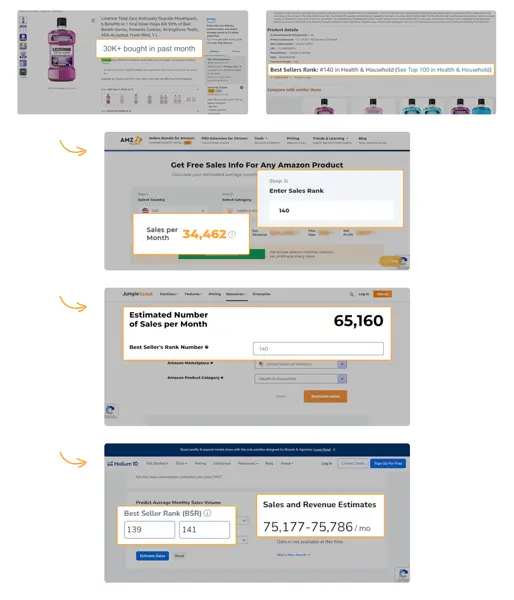
How to read an AMZScout, Jungle Scout and Helium 10 accuracy comparison
A comparison of sales estimates is only as meaningful as the sample of products, the measurement period and the actual data used as a reference. This guide explains how to interpret a vendor’s comparison and repeat it on your catalog.

Start with a reference you can audit
For your own listings, record observed unit sales for the same date range as the estimates. Exclude products whose stocks ran out during the period or label them separately. Check whether the reported number represents a single ASIN, a parent family or multiple sellers’ offers before computing an error.
Read the pattern behind the average
Calculate errors for individual listings and inspect a few outliers. A tool that is close for high-volume products may still be imprecise in small niches. Choose a workflow based on the products and markets you actually source, and keep the vendor’s published experiment distinct from your own measurements.